LevelPlay Dynamic Adapter (V9+)
This guide is intended for Unity LevelPlay Mediation SDK V9+. If you are using an earlier version of the LevelPlay Mediation SDK, please refer to the LevelPlay V8 Integration Guide.
Step 1. Add AscendX LevelPlay Custom Adapter to Your Project
- Unity
- Android
- iOS
Option 1: Install AscendX LevelPlay Custom Adapter via Unity Package Manager (UPM) - Recommended
- For first installation, add scoped registry and dependency to your
Packages/manifest.json:
{
  "scopedRegistries": [
    {
      "name": "AscendX Unity",
      "url": "https://asia-southeast1-npm.pkg.dev/ascendx-463208/asx-upm-prod",
      "scopes": [
        "com.ascendxnow"
      ]
    }
  ],
  "dependencies": {
    "com.ascendxnow.levelplay-mediation-v9-adapter": "1.4.0"
  }
}
- To update to the latest version, open Window → Package Manager, find
AscendX Custom Adapter for LevelPlayin the list, and click Update if an update is available.
Option 2: Manual Installation
Add AscendXDependencies.xml to Your Project.
E.g. <root project>/Assets/Editor/AscendXDependencies.xml
<?xml version="1.0" encoding="utf-8"?>
<dependencies>
    <androidPackages>
        <androidPackage spec='com.knorex:ascendx-mobile-sdk-levelplay-v9-custom-adapter:1.0.0'>
            <repositories>
                <repository>https://asia-southeast1-maven.pkg.dev/knorex-rtb/ascendx-sdk</repository>
            </repositories>
        </androidPackage>
    </androidPackages>
    <iosPods>
        <iosPod name="AscendXLevelPlayV9Adapter" version="~> 1.0.0" source="'https://bitbucket.org/knorexteam/cocoapods-specs.git'" />
        <iosPod name="AscendXSDK" version="~> 2.16.0" source="'https://bitbucket.org/knorexteam/cocoapods-specs.git'" addToAllTargets="true" />
    </iosPods>
</dependencies>
repositories {
    maven { url "https://asia-southeast1-maven.pkg.dev/knorex-rtb/ascendx-sdk" }
}
dependencies {
    implementation 'com.knorex:ascendx-mobile-sdk-levelplay-v9-custom-adapter:1.0.0'
}
target 'My-App' do
    pod 'AscendXLevelPlayV9Adapter', '~> 1.0.0' , :source => 'https://bitbucket.org/knorexteam/cocoapods-specs.git'
end
Step 2. Add AscendX to Your Unity LevelPlay Mediation Waterfall
2.1 Add AscendX as a Custom Network in Your Unity LevelPlay Dashboard
-
Open your app dashboard in Unity LevelPlay.
-
In the LevelPlay Dashboard, go to LevelPlay → Mediation → Setup → Networks.
-
Click on “Add Custom Network” at the bottom of the page.
-
In the Custom network settings page, add the following information and click Save:
Network key: 15c0dbf8d
Network Name: AscendX

2.2 Set Up AscendX Instance for Your App
-
In the LevelPlay Dashboard, go to LevelPlay → Mediation → Setup → Instances.
-
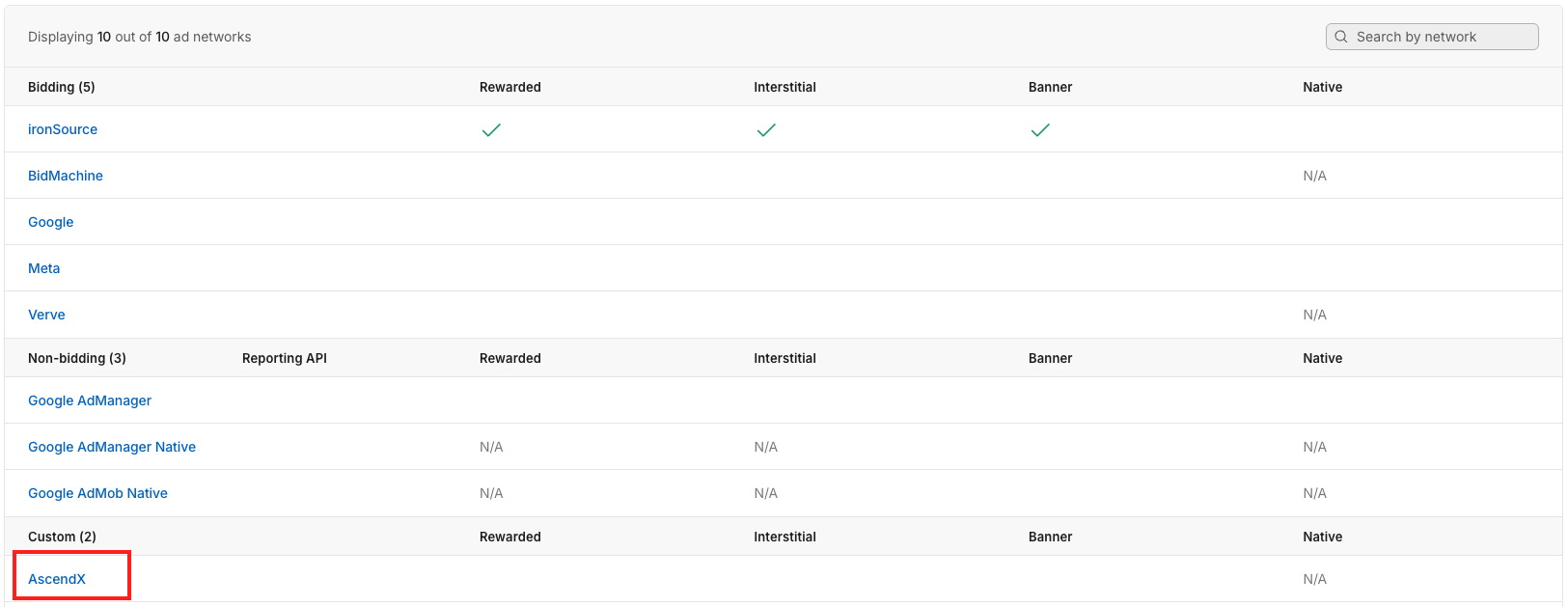
Click on AscendX in the custom networks list.
-
In the app network settings page, click on +Add Instance for each ad format.
-
Fill in the Required Fields
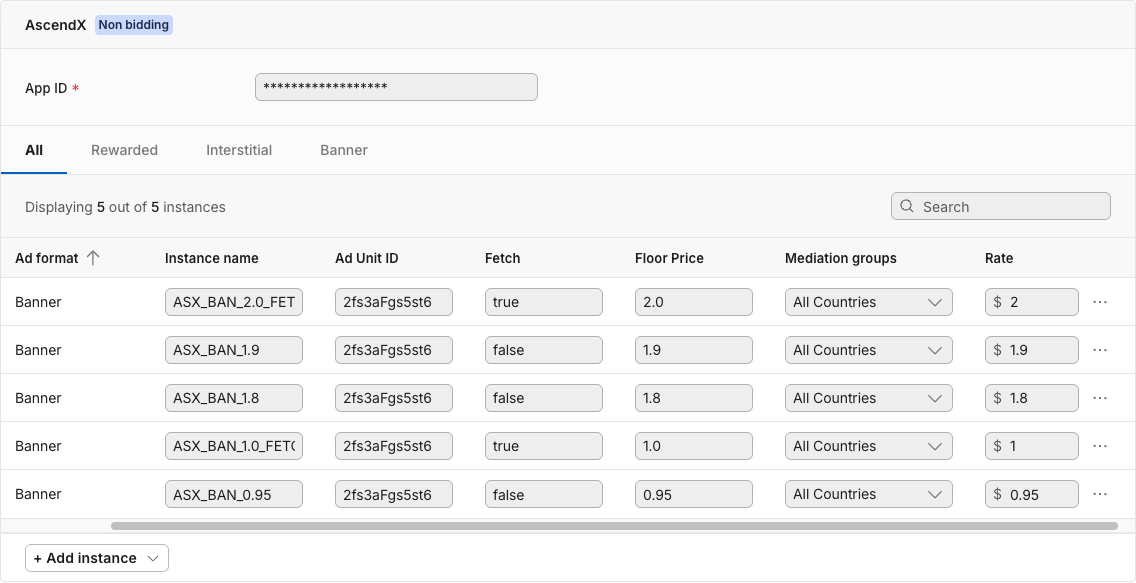
Field Name Value Type Required? Description Example App ID String Yes AscendX provided account ID 43casFgs5st6 Instance Name String Yes This field can be set to any value that helps identify the line item ASX_BAN_1.5_FETCH Ad Unit ID String Yes AscendX provided ad unit ID 2fs3aFgs5st6 Fetch Boolean Yes Indicates whether to make a network request for this line item. Set to trueto fetch from AscendX server, orfalseto use cached bids only.true Floor Price Double Yes The minimum eCPM floor for the ad request 10.5 Rate Double Yes A manual price that should match the Floor Price to ensure the instance is prioritized correctly in the waterfall 10.5
-
Example Configuration:
Step 3. Verify your integration
To ensure proper integration, always start by configuring your AscendX ad units to serve test ads. This helps verify that everything is set up correctly before going live.
App ID: demo-account
| Ad Unit ID | Format | CPM Price | Custom Parameters |
|---|---|---|---|
demo-waterfall-banner-ad | Banner | 10.0 | {"floor_price":10.0,"ad_unit_id":"demo-waterfall-banner-ad","fetch":true} |
demo-waterfall-native-ad | Native | 10.0 | {"floor_price":10.0,"ad_unit_id":"demo-waterfall-native-ad","fetch":true} |
demo-waterfall-interstitial-ad | Interstitial | 50.0 | {"floor_price":50.0,"ad_unit_id":"demo-waterfall-interstitial-ad","fetch":true} |
demo-waterfall-rewarded-ad | Rewarded | 50.0 | {"floor_price":50.0,"ad_unit_id":"demo-waterfall-rewarded-ad","fetch":true} |
ASX banner test ad

ASX Interstitial/Rewarded test ads

Best Practices: Dynamic Fetching Strategy
Dynamic Fetching allows AscendX to behave like a traditional waterfall adapter while maximizing fill rates through price granularity. With this setup, you can increase your opportunities to serve AscendX bids without adding latency to your stack.
How Dynamic Fetching Works
AscendX provides two behaviors depending on the configuration of each line item:
- fetch: true
- Triggers a network request to AscendX.
- Retrieves and caches a fresh bid response.
- Acts similarly to a standard mediation adapter call.
- fetch: false
- Does not initiate a new network request.
- Uses the locally cached bid from the most recent fetch:
trueline item. - Enables instant checks with zero network overhead.
By combining these two modes, publishers can create a waterfall structure that is both efficient and flexible.
Recommended Setup Strategy
To maximize AscendX performance, we recommend creating multiple line items with different floor prices. This provides:
- Price granularity: Better alignment with AscendX’s dynamic ->bid values.
- Higher fill rates: More line items → more opportunities to match bids.
- No additional latency: Non-fetch items read exclusively from cache.
- Retry points: Additional
fetch: trueline items allow AscendX to request again at lower floors if no qualified bid is cached.
A common approach is
- Place a fetch: true item at your highest priority floor.
- Add 2–3 non-fetch line items directly below it.
- Add a second fetch: true item at a mid-lower floor.
- Follow with additional non-fetch floors as needed.
Example Configuration:
| Line Item | fetch | floor_price | Behavior |
|---|---|---|---|
| ASX-2.0 | true | 2.0 | Initiates a network request; fills or caches the returned bid |
| ASX-1.9 | false | 1.9 | Uses cached bid if price >= 1.9 |
| ASX-1.8 | false | 1.8 | Uses cached bid if price >= 1.8 |
| ASX-1.0 | true | 1.0 | Second fetch point; requests a new bid if required |
| ASX-0.9 | false | 0.9 | Uses cached bid if price >= 0.9 |
| ASX-0.8 | false | 0.8 | Uses cached bid if price >= 0.8 |
-> This structure ensures efficient waterfall progression without unnecessary network calls.
Key Benefits
-
Traditional waterfall behavior:
Each
fetch: trueline item functions like a full adapter call, aligning with familiar mediation setups -
Price granularity:
Multiple floors increase the likelihood that AscendX's bid will qualify at one of your line items.
-
Zero Additional Latency:
Non-fetch floor prices (
fetchset tofalse) rely solely on cached responses—no network calls, no waiting. -
Controlled Retry Logic:
Strategic placement of
fetch: trueat different price points provides multiple chances to fetch bids -
Flexible and Transparent:
Publishers retain full control over line item structure and behavior.